MCP
Work on your site with AI
cmsspot gives Claude two ways in. One edits a site you have connected, with a token you control. The other is a free guide that tells Claude how to build or convert a site so it fits cmsspot from the first file. Both use MCP, the standard way AI assistants connect to tools.
Edit a connected site with Claude
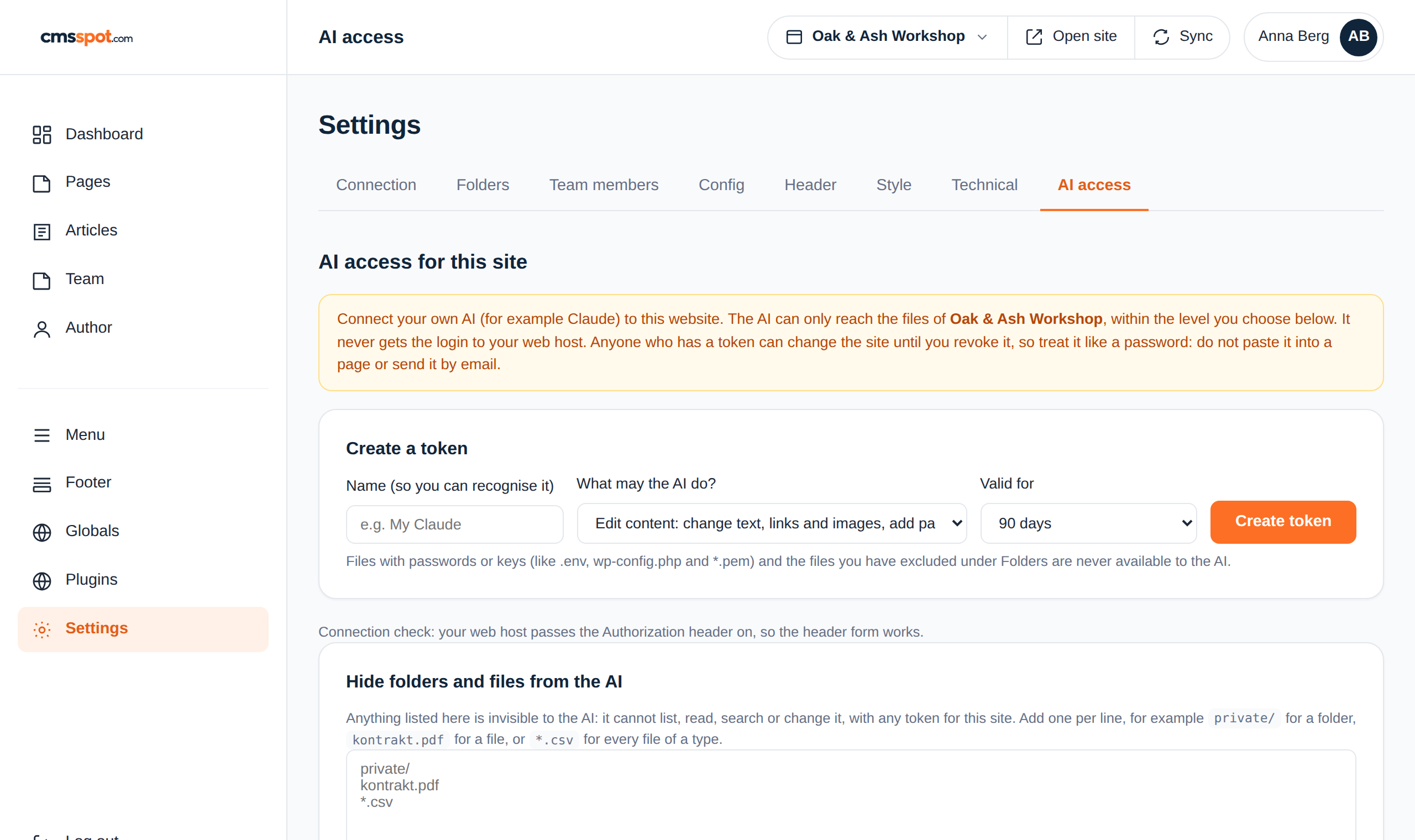
cmsspot has a built-in MCP server. In the AI access tab you create a token for one site, choose what the assistant may do, and set when the token expires. Add it to Claude, and you can ask for changes in plain words. The page keeps its layout, because the assistant changes fields, not the design.
You decide what it may touch
Three levels: read only, edit content, or full file access. Files with passwords are always hidden, and you can hide any other folder or file yourself. Every call is logged, and a token can be revoked in one click.
The token is only ever sent in a request header, never in a link, so it does not end up in browser history or server logs.
Things you can ask for
- "Go through all pages and tell me which titles are too long." It reads and answers, without changing anything.
- "Rewrite the services page so it answers what a new roof costs." It changes the text fields and nothing else.
- "Add a page about winter storage and put it in the menu." It creates the page from the site's own template.
- "Check every page for missing alt texts." It reports back with a list.
How to connect it
In Claude.ai or Claude Desktop, add a custom connector with the address cmsspot shows you, and give it the token as an Authorization header. In Claude Code, cmsspot gives you one command to paste:
claude mcp add --transport http cmsspot https://cmsspot.com/mcp --header "Authorization: Bearer cs_…"
AI access works for sites connected over SFTP. More detail in AI, SEO and GEO and the article Let Claude edit your site.
Build a new site with the free build guide
The build guide is a separate MCP server at mcp.cmsspot.com. It has no login and no access to anything. It tells Claude how a site should be put together to be fast, easy to find and editable in cmsspot, gives it starter files, and checks every page it writes.
claude mcp add --transport http cmsspot-build https://mcp.cmsspot.com/build
Then say what the business is and which pages you want:
You get a folder with the pages, a shared header and footer, one stylesheet and an .htaccess, ready to upload to any PHP host and connect in cmsspot.
Convert an existing site, or start from Figma
The same build guide can bring a page from a builder, a theme or another CMS into the cmsspot structure. It does the mechanical part on its own and lists what needs a human eye: which text should be a heading, which cards should be a group, which images lack alt text.
Have a design in Figma? Add Figma's own MCP server in the same Claude session. Claude reads the design as data and builds clean pages from it with the guide, instead of exporting layers as boxes.
Step by step: Build and convert with AI · Figma to cmsspot
| AI access | Build guide | |
|---|---|---|
| What it is for | Editing a site you have connected | Building or converting a site |
| Where it lives | Inside cmsspot, at /mcp | mcp.cmsspot.com/build |
| Login | A token per site, with an expiry | None |
| What it can touch | One site, at the level you choose | Nothing. It reads only what Claude sends it |
| Price | Free | Free |
Both servers follow the MCP standard over HTTP, so other clients that support remote MCP servers can use them too.
Pages that AI assistants can read
The other side of AI is being found by it. Assistants quote pages they can read cleanly: a clear heading, a short factual paragraph, content in the HTML rather than behind scripts. A hand-built site already looks like that, and cmsspot keeps it that way. Read about AI, SEO and GEO.
Questions about AI and MCP
What is MCP?
The Model Context Protocol is the standard way for AI assistants such as Claude to connect to tools. An MCP server gives the assistant abilities it does not have on its own, such as reading the pages of one website.
Which Claude do I need?
Claude.ai, Claude Desktop and Claude Code all support remote MCP servers. In Claude.ai and Claude Desktop you add them as custom connectors, which requires a paid Claude plan.
Can the assistant reach my other sites or my server login?
No. A token for AI access is tied to one site and one user. The assistant never sees the server login, cannot run code on the server, and files with passwords are always hidden from it.
Does cmsspot send my content to an AI?
No. cmsspot uses no language model of its own. Your content only reaches an assistant when you connect one and ask it to work on the site.
Does the build guide need an account?
No. The build guide at mcp.cmsspot.com is free, has no login and stores nothing. You only need a cmsspot account to connect and edit the finished site.
Get started
Connect your site and your assistant
Create a free account, connect a site, and create a token for Claude.